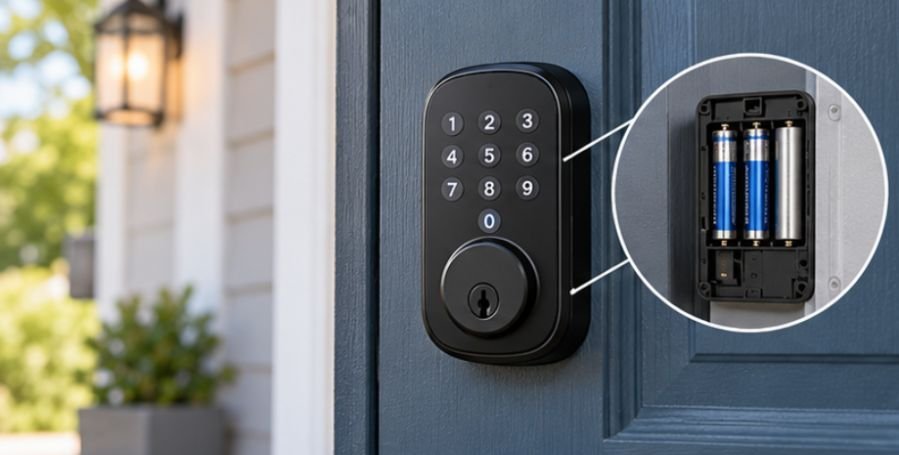
Here is the detail that can save you from opening a wall for no reason: smart door locks normally do not use a thermostat C-wire at all. If you are researching how to install smart lock without c wire, you can usually stop worrying about electrical wiring and start checking your door instead.
Most residential smart deadbolts sold in the United States contain their own battery power supply. The small cable you may see during installation simply connects the exterior keypad or electronics to the interior lock assembly. It is not a household power wire.
The real challenges are door thickness, deadbolt alignment, backset, battery access, Wi-Fi setup, and making sure the motor can throw the bolt without resistance.
Why a Smart Lock Does Not Need a C-Wire
The confusion usually comes from smart thermostats. In HVAC systems, a C-wire, or common wire, can provide continuous low-voltage power to devices such as thermostats.
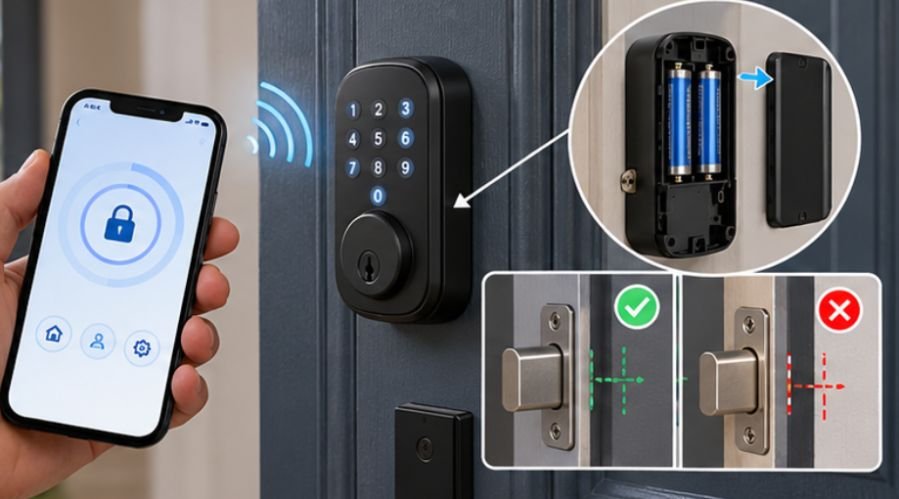
A smart deadbolt is designed differently. Its electronics, keypad, wireless radio, sensors, and small motor typically receive power from AA batteries, lithium cells, or a removable rechargeable battery pack.
That distinction matters because running thermostat wire to a door would add unnecessary complexity to what is normally a straightforward mechanical retrofit.
For homeowners upgrading older properties, integrating a smart lock can be one part of a broader modernization strategy. Exploring these smart home automation ideas for old homes can help identify other practical ways to improve convenience, connectivity, and everyday functionality without extensive renovations.
Some commercial access-control systems do use low-voltage building wiring, electric strikes, magnetic locks, or powered door hardware. Those systems are fundamentally different from the battery-operated residential smart locks homeowners typically install.
Check the Door Before Buying the Lock
Successful installation depends more on mechanical compatibility than wiring.
Measure the Backset
Backset is the distance from the edge of the door to the center of the deadbolt hole. Residential deadbolts commonly use adjustable latch mechanisms, but never assume a new lock fits automatically.
Measure your existing opening and compare it with the manufacturer’s specifications before removing anything.
Check Door Thickness
Smart-lock mounting screws and tailpieces are designed for a specified range of door thicknesses. An unusually thin, thick, decorative, or reinforced door may require a different model or adapter.
Also inspect how much clearance exists around decorative trim. Large interior battery housings sometimes collide with molding or unusually close door hardware.
Test the Existing Deadbolt
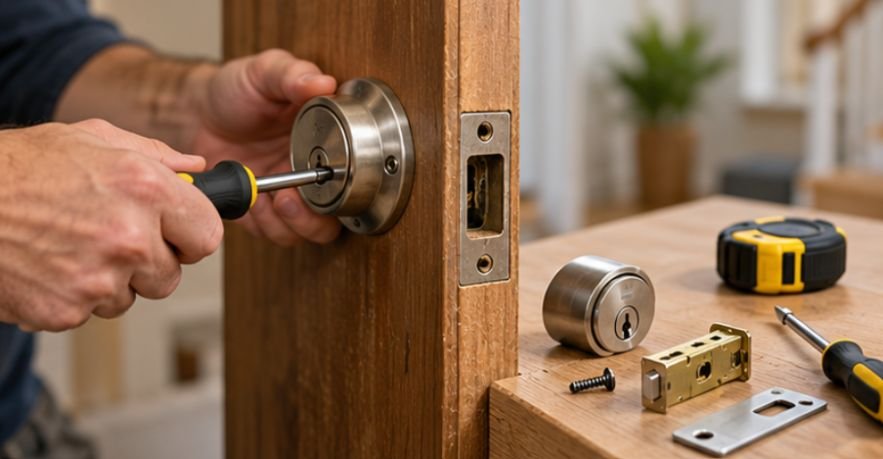
Open the door and operate the deadbolt by hand. The bolt should move smoothly without requiring significant force. Then close the door and repeat the test.
If it becomes difficult only when the door is closed, the problem is probably alignment between the bolt and strike plate. Fixing that before installing the smart lock can prevent calibration failures and excessive battery drain.
Consumer Reports’ testing also shows that physical lock construction still matters even when electronic features are added. A connected lock should therefore be evaluated as both a security device and a piece of mechanical door hardware.
Tools You Are Likely to Need
For most replacement installations, a No. 2 Phillips screwdriver does most of the work. A tape measure is useful for checking door dimensions and backset.
Keep a pencil, utility knife, and small chisel nearby only if the latch or strike plate needs a minor adjustment. Do not start enlarging holes until you have confirmed the dimensions required by your specific lock.
Power drills can speed up installation, but aggressive tightening can strip screws, distort mounting plates, or bind the deadbolt mechanism.
Precision and material compatibility are equally important in more demanding fabrication projects, where the choice of tools and manufacturing method can affect the final component. For a deeper look at these considerations, explore whether you can 3D print rocket engine nozzles out of metal at home.
How to Install Smart Lock Without C Wire Step by Step
1. Remove the Existing Deadbolt
Keep the door open during installation so you cannot accidentally lock yourself out. Unscrew the interior thumb-turn assembly while supporting the exterior portion of the deadbolt. Separate the two halves, then remove the screws holding the latch at the edge of the door. Slide the latch mechanism out.
2. Install and Orient the New Latch
Insert the smart lock’s supplied latch into the edge bore. Many models mark the correct orientation with an arrow or the word “UP.” Confirm the backset setting before tightening the faceplate. Extend and retract the bolt manually. It should move freely.
3. Position the Exterior Keypad
Feed the lock’s connector cable through the designated opening while guiding the tailpiece through the latch mechanism. Hold the keypad or exterior housing flat against the door. Do not pull the cable sharply or route it where the mounting plate can crush it.
4. Attach the Interior Mounting Plate
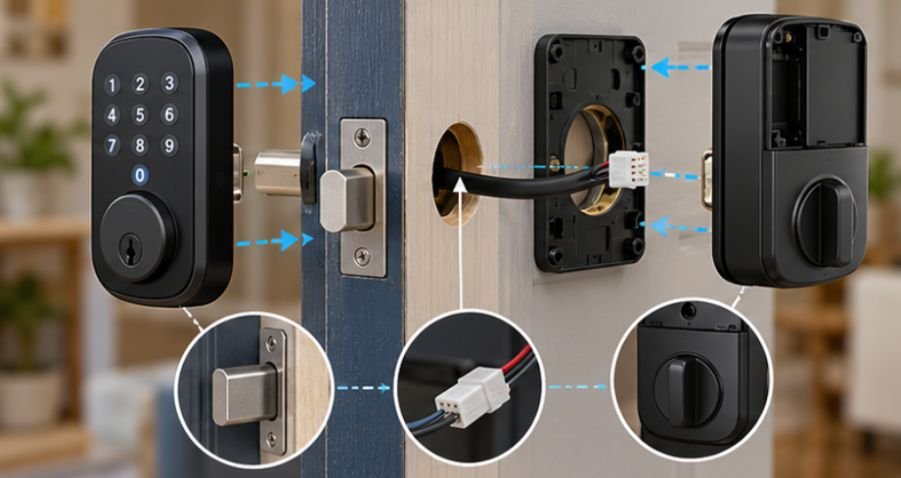
From inside the home, route the cable through the opening or notch specified by the manufacturer. Install the mounting screws gradually, alternating between them instead of completely tightening one side first. The exterior keypad should remain straight while the plate becomes secure. A distorted mounting plate can create enough friction to interfere with the lock motor.
5. Connect the Electronic Harness
Plug the exterior cable into the corresponding connector on the interior assembly. Most connectors have a specific orientation. Never force one into place. Carefully fold excess wire into the space provided so it cannot become trapped between the housing and mounting plate.
6. Install the Interior Lock Assembly
Align the interior mechanism with the deadbolt tailpiece. Secure the housing according to the manufacturer’s instructions, but avoid excessive torque on plastic components. Before installing batteries, manually check the lock again if the design permits it.
7. Add the Batteries
Install the specified batteries or rechargeable pack with the correct polarity. Battery chemistry matters. If the manufacturer specifies alkaline batteries, substituting rechargeable cells with different voltage characteristics may reduce battery-life accuracy or performance.
8. Calibrate With the Door Open
Most modern smart locks perform an initial handing or calibration process so the motor learns which direction represents locked and unlocked.
Run this procedure with the door open first. That prevents a misaligned strike plate from being mistaken for an electronic problem. Once calibration succeeds, close the door and test the deadbolt several times.
Security Setup Matters as Much as Installation
Once the mechanical work is complete, treat the lock like any other internet-connected device.
The Federal Trade Commission recommends securing connected home devices by changing default credentials, keeping connected products updated, using strong unique passwords, and enabling two-factor authentication where available.
CISA similarly advises users to consider the security characteristics of Internet of Things products because connected devices introduce risks beyond their physical functions.
NIST has developed a consumer IoT cybersecurity baseline covering security capabilities manufacturers and buyers should consider for connected household products.
After pairing the lock, enable automatic firmware updates when appropriate and use individual access codes rather than sharing one PIN among everyone.
Do Not Ignore Accessibility and Emergency Egress
A smart feature should never make a door unnecessarily difficult to operate from inside. The U.S. Access Board’s accessibility guidance says compliant door hardware should permit one-handed operation without tight grasping, pinching, or twisting of the wrist.
Local building, rental, fire, HOA, and historic-property requirements can also affect hardware changes. Renters should obtain approval before replacing landlord-owned locks, especially when key access or property-management access must be preserved.
Troubleshooting a Smart Lock That Will Not Work Properly
If the motor sounds strained, remove battery power and test the deadbolt mechanically. A motor should not have to overcome a poorly aligned door.
If the lock works with the door open but fails when closed, inspect the strike plate rather than resetting the app repeatedly.
For pairing problems, move the phone closer, confirm Bluetooth permissions, restart the manufacturer’s app, and verify that any required 2.4 GHz Wi-Fi network is available.
Connectivity problems can also affect smart locks that rely on a stable wireless connection for remote access and notifications. Understanding why smart home devices keep disconnecting can help you identify network-related issues before assuming the lock itself is faulty.
Rapid battery drain can point to weak wireless connectivity, repeated motor resistance, unsuitable batteries, extreme temperatures, or excessive remote activity.
Frequently Asked Questions
1. Can I install a smart lock if my house has no C-wire?
Yes. Standard residential smart locks generally use batteries and do not require the C-wire associated with HVAC thermostats.
2. Does a Wi-Fi smart lock need electrical wiring?
Usually not. Built-in Wi-Fi smart deadbolts commonly operate from batteries, although exact power requirements depend on the manufacturer and model.
3. Can I install a smart lock on an existing deadbolt hole?
Often yes. Retrofit models are designed around common residential deadbolt dimensions, but you should verify backset, door thickness, bore size, and clearance first.
4. Why does my smart lock jam after installation?
The strike plate, deadbolt, or mounting assembly is probably misaligned. Test operation with the door open before assuming the electronic components are defective.
Final Thoughts
The surprising answer to how to install smart lock without c wire is that there usually is no missing wire to solve. A residential smart deadbolt is normally a battery-powered device built to replace or operate an existing mechanical deadbolt.
Spend your installation time checking the things that actually affect reliability: door dimensions, latch orientation, strike alignment, cable routing, mounting pressure, battery type, calibration, and network security.
If the bolt glides effortlessly by hand before the electronics take over, you have already eliminated one of the biggest causes of smart-lock problems. The smartest installation starts with getting the ordinary mechanical details right.