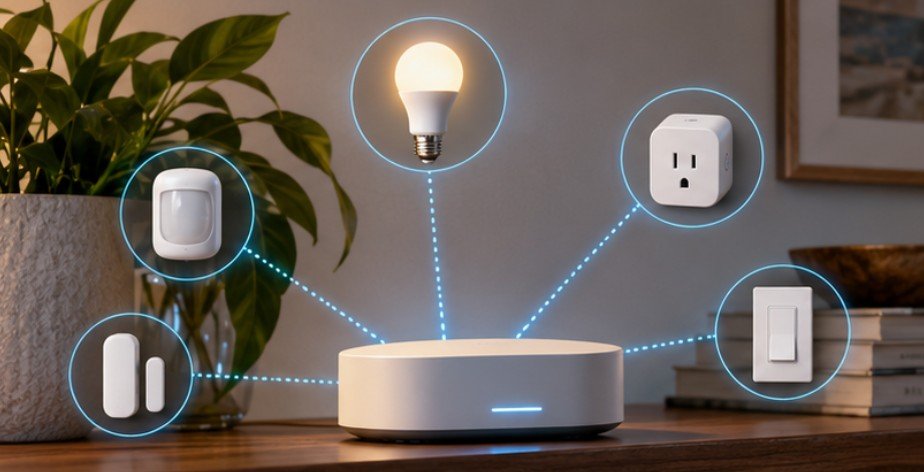
A tiny battery-powered door sensor can communicate across a house without joining your Wi-Fi network, maintaining a broadband connection, or transmitting large amounts of data. That seemingly simple trick explains much of Zigbee’s appeal.
If you have wondered how does Zigbee work in smart home technology, the short answer is that Zigbee creates a low-power wireless network in which compatible devices can communicate directly and, in many installations, relay messages for one another. Instead of making every light, plug, switch, and sensor compete for space on your Wi-Fi network, Zigbee gives home-automation devices a network designed specifically for short commands and sensor data. That difference becomes increasingly useful as a smart home grows from three devices to thirty.
Zigbee Was Built for Small Messages, Not Big Data
Zigbee operates on technology derived from the IEEE 802.15.4 standard for low-rate wireless networks. The current IEEE 802.15.4 standard covers wireless communication intended for devices with limited energy resources rather than applications demanding Wi-Fi-like bandwidth.
That makes Zigbee well suited to messages such as:
“Door opened.”
“Motion detected.”
“Set brightness to 40 percent.”
“Temperature is 72°F.”
A security camera transmitting continuous high-definition video needs substantial bandwidth, so Wi-Fi makes more sense. A leak sensor that sends only occasional status updates does not.
The Connectivity Standards Alliance says Zigbee supports the globally available 2.4 GHz band as well as regional sub-GHz options. At 2.4 GHz, raw throughput can reach 250 Kbps—tiny compared with modern Wi-Fi but plenty for switches, sensors, locks, plugs, and lighting commands.
For the technical foundation, the IEEE 802.15.4 low-rate wireless standard provides useful background.
The Mesh Network Is Where Zigbee Gets Interesting
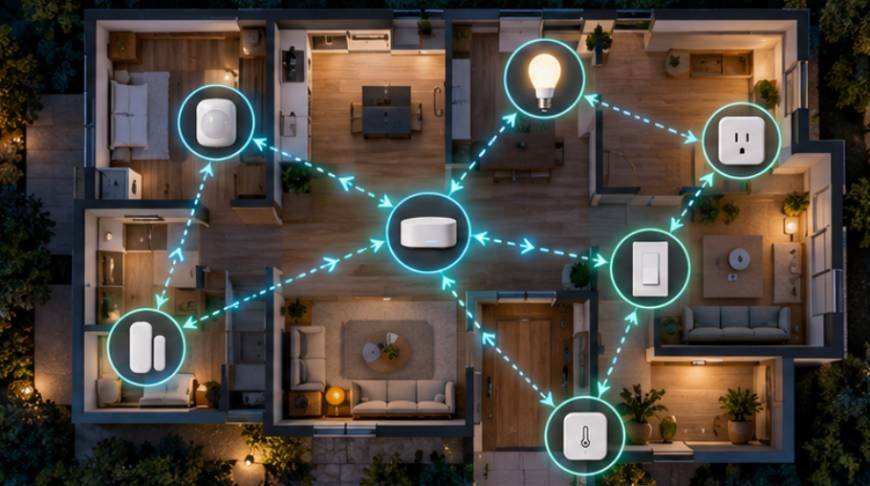
The defining feature of many Zigbee smart-home installations is mesh networking. Imagine a smart hub in the living room, a Zigbee plug halfway down a hallway, and a Zigbee light switch in a distant bedroom. The switch does not necessarily need a strong direct radio connection to the hub. Its message may travel through another Zigbee router first.
Research published by the U.S. National Institute of Standards and Technology has described Zigbee wireless mesh networking as a flexible, low-cost approach for connecting sensors, actuators and appliances in building-control systems.
Readers interested in the engineering research can review the NIST study of Zigbee wireless mesh networks.
Coordinator: The Network Organizer
A Zigbee network normally has a coordinator that establishes and manages the network. In a consumer smart home, that job is commonly performed by a Zigbee hub, gateway, or controller.
The coordinator can also provide the bridge between Zigbee devices and another system, allowing a phone app or home-automation platform to control them. It is better to think of the coordinator as a network manager than as a Wi-Fi router.
Routers: The Devices That Strengthen the Mesh
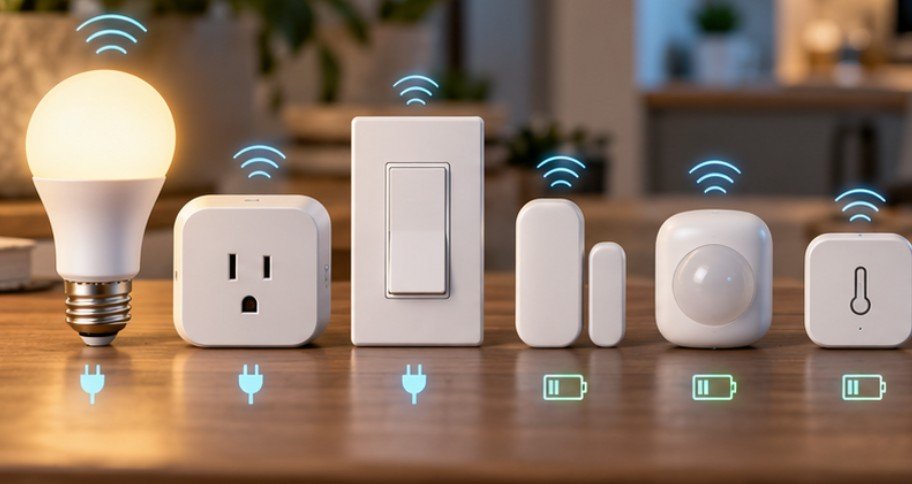
Powered Zigbee devices can often function as routers. Smart plugs, in-wall switches and certain bulbs can receive a packet and forward it toward its destination. This is why adding the right powered devices can actually improve a Zigbee installation.
One useful rule is simple: if distant Zigbee sensors are unreliable, adding a well-positioned powered Zigbee router may be more effective than moving the hub several feet.
End Devices: Designed to Sleep
Battery-operated motion detectors, contact sensors and environmental sensors commonly behave as end devices.
They do not need to remain fully awake listening to network traffic continuously. They can sleep for long periods, wake when necessary, exchange a short message and conserve energy again.
A University of Delaware home-automation project provides an academic example of Zigbee/IEEE 802.15.4 being used for energy-conscious wireless home control.
See the University of Delaware Zigbee home-automation research for additional technical context.
What Happens When You Press a Zigbee Switch?
Understanding how does Zigbee work in smart home technology becomes easier by following one command.
Suppose you press a wireless Zigbee button configured to switch on a lamp.
First, the button wakes and generates a small command. It sends that packet to its parent or another appropriate device on the Zigbee network. If the destination cannot be reached directly, routers can relay the message across the mesh. The receiving lamp or controller processes the instruction, and the network can acknowledge successful communication.
All of this can happen without sending the command through the public internet.
That distinction matters. Zigbee itself is a local wireless technology. Whether an automation still works during an internet outage depends on the hub and smart-home platform handling the automation, but Zigbee does not inherently require every device to communicate through a remote cloud server.
Why the Network Can Become Better as You Build It
Wi-Fi devices generally communicate with an access point. Zigbee’s mesh design gives powered routers another role: creating additional communication paths.
The Connectivity Standards Alliance describes Zigbee mesh networks as self-organizing and self-healing, meaning routing can adapt when available network paths change. The practical result is important.
A smart plug near the staircase may help traffic get from downstairs sensors to an upstairs coordinator. Adding strategically positioned powered nodes can fill weak areas instead of merely adding more endpoints.
A well-designed smart-home network can also support energy-saving routines when integrated with compatible devices such as smart thermostats.
By coordinating connected sensors and temperature controls, homeowners can automate heating and cooling schedules around occupancy and daily habits. Learn more about whether smart thermostats actually save money to understand how automation can reduce unnecessary HVAC use and potentially lower energy bills.
California Polytechnic State University has also documented IEEE 802.15.4/Zigbee mesh networking in wireless sensor applications where low power and multi-node coverage were priorities. Its Cal Poly wireless mesh network project offers a useful real-world academic example.
Zigbee Is Efficient, but 2.4 GHz Can Get Crowded
Zigbee is not immune to radio interference. Many US smart-home Zigbee products operate around 2.4 GHz—the same general spectrum used by 2.4 GHz Wi-Fi, Bluetooth and microwave ovens.
Although Zigbee and Wi-Fi serve different purposes in a smart home, both can be affected by radio interference and poor signal coverage.
If your connected devices experience frequent disconnections or unreliable communication in distant rooms, these practical strategies for improving Wi-Fi coverage for smart home devices can help you address weak-signal areas and build a more dependable wireless environment.
NIST testing has specifically examined interference affecting IEEE 802.15.4 networks inside buildings and noted potential coexistence issues with technologies including Wi-Fi and Bluetooth.
Zigbee reduces these problems through multiple available channels, collision-avoidance mechanisms, retransmissions and relatively short periods of radio activity.
If devices repeatedly disappear from a network, therefore, do not immediately assume the sensors are defective.
Zigbee, Matter and the Compatibility Misconception
Matter does not simply turn Zigbee devices into native Matter-over-Zigbee products. Matter commonly uses Ethernet, Wi-Fi and Thread for connectivity. Existing Zigbee ecosystems can instead participate through compatible bridges that expose supported Zigbee devices to Matter platforms.
That distinction is increasingly important for buyers trying to protect an existing smart-home investment.
The Zigbee ecosystem is also still evolving. The Connectivity Standards Alliance announced Zigbee 4.0 in November 2025, alongside Suzi, its sub-GHz extension intended to increase range and expand potential applications.
Zigbee therefore has not simply been replaced by newer standards.
When Zigbee Makes Sense—and When It Doesn’t
Zigbee is particularly attractive for houses using numerous motion sensors, switches, smart plugs, contact sensors, lights and other devices that exchange small amounts of information.
It is less appropriate for cameras, media streaming and devices requiring substantial continuous bandwidth.
Zigbee can be especially useful when modernizing older houses, where thick walls, limited wiring options, and existing layouts can complicate smart-home upgrades. With careful device selection and strategically placed powered devices, homeowners can build practical automation systems without replacing every existing fixture.
Explore these smart home automation ideas for old homes for inspiration on introducing connected lighting, sensors, and other conveniences into older properties.
The strongest setup is usually not the one with the greatest number of devices. It is the one with a well-positioned coordinator, enough powered routing devices, sensible radio-channel planning and hardware that is actually supported by the selected platform.
Frequently Asked Questions
1. Does Zigbee require Wi-Fi?
No. Zigbee devices communicate over their own wireless network. A hub may use Wi-Fi or Ethernet for apps, cloud features or remote access, but Zigbee radio communication itself does not require Wi-Fi.
2. How does Zigbee work in smart home technology during an internet outage?
Zigbee can continue exchanging local messages without internet access. Whether automations keep functioning depends on whether the hub processes those routines locally or requires a cloud service.
3. Do all Zigbee devices extend the network?
No. Powered Zigbee routers commonly relay messages, while battery-operated end devices generally sleep to conserve power and do not serve as network repeaters.
4. Is Zigbee better than Wi-Fi for smart homes?
Neither is universally better. Zigbee excels at low-power sensors and large automation networks; Wi-Fi is better for bandwidth-intensive products such as cameras and devices requiring direct IP connectivity.
The Takeaway
The clever part of Zigbee is not raw speed. It is how little speed many smart-home devices actually need.
By letting low-power sensors sleep, allowing powered devices to relay short messages, and building alternative paths through a mesh, Zigbee turns dozens of simple devices into a coordinated network without forcing every switch or sensor onto Wi-Fi. Its limitations—especially 2.4 GHz interference and ecosystem compatibility—are real, but manageable.
Build the mesh deliberately, choose certified compatible hardware, and place powered routers where coverage needs help. A Zigbee home becomes more reliable when the network is designed as a network, not merely a collection of gadgets.