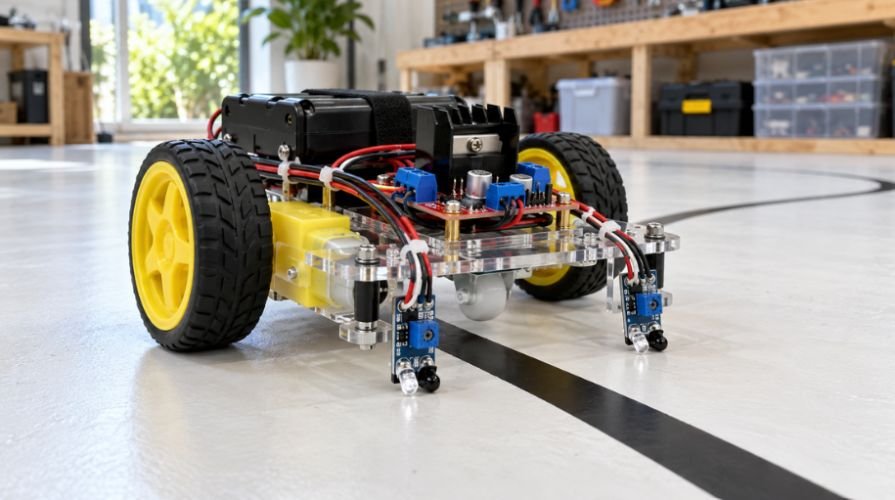
Your robot can follow a taped track without running a single line of code. Two sensors detect the surface, and a motor driver switches the wheels to correct its direction.
When explaining how to build a line follower robot without microcontroller, I start with sensor polarity. Get that wrong, and a neatly assembled robot will confidently drive away from the line.
My approach uses adjustable digital IR sensor modules and an L298N driver module. The goal is a simple robot that follows broad curves, with wiring you can check before its wheels touch the floor.
How the No-Code Steering Circuit Works
Each sensor shines infrared light toward the track and measures the reflection. Its comparator turns that measurement into a HIGH or LOW output.
Black tape often reflects less infrared than white paper, but materials vary. Pololu’s reflectance sensor application note explains why surface reflectivity and sensor distance matter.
For this build, use sensors that output HIGH over white and LOW over black. Mount them on either side of the line.
When both detect white, both motors run. When the left sensor detects black, the left motor switches off. The right wheel keeps driving, steering the robot left. The opposite happens on a right turn.
Connect each sensor to the motor on the same side for this arrangement. Cross-wiring reverses the intended correction.
Both sensors detecting black disables both motors. Both detecting white also occurs when the robot loses the track, so this circuit cannot reliably recover from gaps.
Parts for an IR Sensor Line Follower Robot
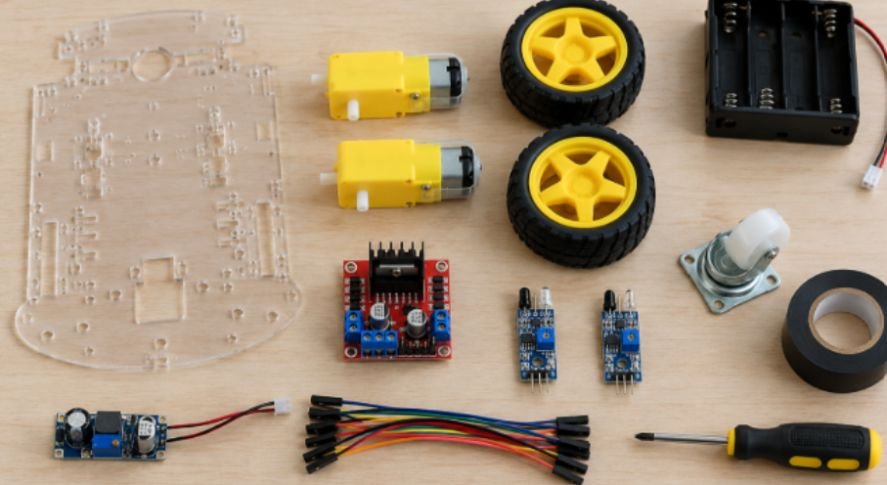
Gather these components before assembling your DIY line follower robot:
- A lightweight chassis, two geared DC motors, two wheels, and a caster.
- Two downward-facing, 5V-compatible IR reflectance modules with digital outputs and adjustable thresholds.
- An L298N motor driver module with accessible ENA and ENB pins.
- A suitable motor battery, switch, and regulated 5V supply.
- Jumper wires, mounting hardware, a multimeter, and optional pull-up resistors.
Select motors by rated voltage and stall current, not RPM alone. Check your driver module’s documented thermal and current limits.
An L293D is another option, but its pinout differs. Texas Instruments specifies up to 600mA per channel, making motor selection especially important.
For rechargeable power, use a protected battery pack and its compatible charger. A nominal 7.4V lithium pack reaches 8.4V fully charged; account for that when selecting components.
Assemble the Chassis and Position the Sensors
Secure the motors squarely so the wheels remain parallel. Mount the battery low and close to the center.
Place both sensors ahead of the drive wheels. Keep their brackets adjustable so you can change height and spacing.
I would begin near the manufacturer’s recommended sensing distance, then calibrate on the actual track. A universal mounting height will not suit every module.
Here is a calculated starting example: use 19mm tape and place the sensing centers 25mm apart. Each center sits approximately 3mm beyond its nearest tape edge when centered.
That gives a small sideways deviation before one sensor crosses onto black. Actual detection depends on the sensing footprint, so treat these dimensions as a starting point.
Wire the L298N Motor Driver Circuit
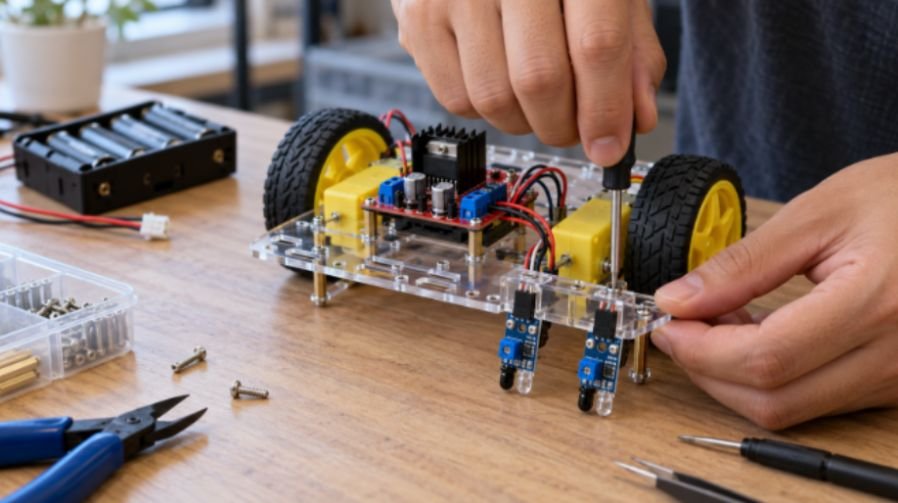
Disconnect the battery while wiring. Keep motor current paths short and use secure terminals.
Connect Power and Ground
Connect battery positive through the switch to the module’s motor supply terminal. It may be labeled “12V,” even when operating at another permitted voltage.
Connect battery negative to driver GND.
Use regulated 5V for the sensor modules and driver logic. Join their grounds to the driver ground.
Check your module’s instructions before connecting external 5V. Its regulator jumper may determine whether the 5V terminal acts as an input or output.
I prefer a documented external regulator arrangement because onboard regulators can lose regulation as battery voltage falls. Never connect two regulator outputs together.
Set Motor Direction
Connect the left motor to OUT1 and OUT2. Connect the right motor to OUT3 and OUT4.
Set IN1 and IN3 HIGH using the regulated logic supply. Set IN2 and IN4 LOW by connecting them to ground.
These states establish one direction for each motor. Because the motors face opposite sides, you may need to reverse one motor’s wires.
STMicroelectronics’ L298 documentation confirms that its enable inputs control the bridges independently of the direction inputs.
Connect Sensors to Enable Pins
Remove the ENA and ENB jumper caps.
Connect the left sensor’s digital output to ENA. Connect the right sensor’s digital output to ENB.
This assumes HIGH on white and LOW on black. Verify those states with a multimeter before proceeding.
If a module has an open-collector output without an onboard pull-up, add an appropriate pull-up to 5V. SparkFun’s pull-up resistor explanation describes how this establishes a defined HIGH state.
If your sensors have opposite polarity, use compatible selectable-polarity modules or add inverter stages. Swapping sensor connections alone does not fix every polarity mismatch.
Calibrate and Test Your Robot
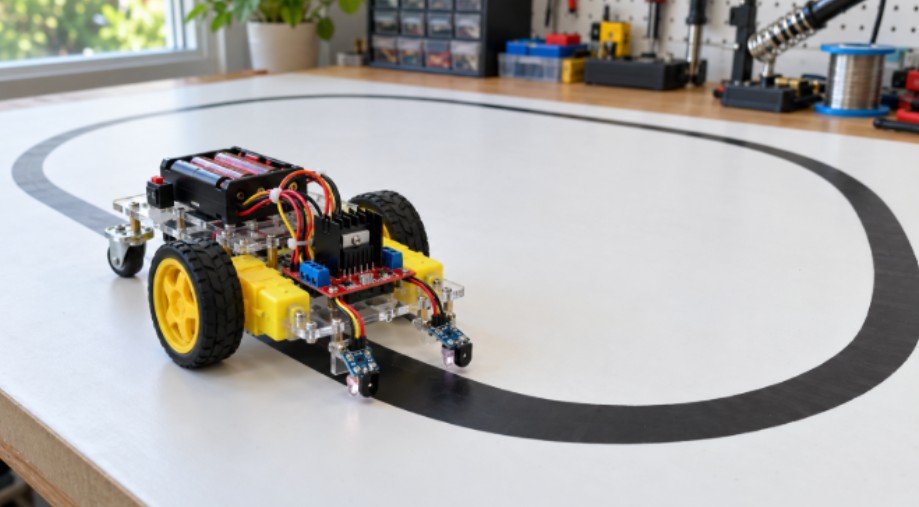
Lift the wheels clear of the bench before switching on.
Place white track material underneath both sensors. Adjust each potentiometer until its output reads HIGH.
Move black tape beneath each sensor and confirm LOW. Repeat under the lighting where the robot will operate.
Do not rely solely on indicator LEDs. Some indicate detection rather than the electrical output state.
Next, check movement. Both wheels should drive forward over white. If one runs backward, disconnect power and reverse that motor’s wires.
Cover the left sensor with black tape. Only the left motor should switch off. Repeat on the right.
Finally, test a large oval track. Begin with broad curves and a level, matte surface. Change one setting at a time.
Troubleshoot Tracking Problems
If the robot turns away from the line, check output polarity, motor direction, and sensor-to-enable wiring.
If it repeatedly zigzags, reduce speed and adjust sensor spacing. Fast motors can carry the chassis past the correction point.
If detection changes near a window, recalibrate under stable lighting and shield the sensors from stray light.
If the motors hesitate, measure supply voltage while they start. Check battery capacity, loose connections, and voltage loss across the driver.
If the driver becomes hot, investigate motor current and mechanical binding before continuing.
Sharp corners, intersections, and broken lines exceed this basic circuit’s capabilities. More complex behavior requires additional hardware logic or programmable control.
Skip the Code. Nail the Circuit.
My priority is predictable steering before speed. I would first verify four things: stable power, correct sensor polarity, forward wheel rotation, and same-side motor control.
Once the robot completes several broad loops, a DIY robotic arm project is another practical way to explore motor control and mechanical movement. For now, make one clean lap your next milestone.
A Gesture controlled robot can become a useful later project for exploring command-based movement. For now, make one clean lap your next milestone.
Frequently Asked Questions
1. Can I build this robot without Arduino or programming?
Yes; comparator-based sensors can control a compatible motor driver through fixed hardware connections.
2. Can I use an LM358 instead of ready-made sensor modules?
Yes, with a properly designed sensor circuit, reference threshold, and compatible output stage; it is not a drop-in replacement.
3. Why does my robot stop when both sensors detect black?
Both sensor outputs go LOW in this design, disabling both motor channels.
4. Can this robot follow a white line on black?
Yes, but you must revise the output polarity, sensor placement, and control logic for that track.